Tuesday, February 25, 2014

[BB] Blackboard office hours 2/26/2014

Dear Blackboard users,


Please join us on Wednesday, 2/26/2014, 3:30 p.m. - 4:30 p.m., for our "UM Bb Office Hours" webinar. You can participate from your office, your home, or anywhere you can get an internet connection. Sessions will take place using Collaborate, the web conferencing system built into Blackboard. 

Go to http://tinyurl.com/umiamibb, enter your name, and the Collaborate java application should start. It should all be automatic, but it may take a few minutes the first time you do it. You can even try it out right now, to make sure you can get in.

There will be presentations on using Collaborate as a participant, leading a Collaborate session and Blackboard adaptive release. There will also be plenty of time for open discussion and questions. 

We plan on doing this every Wednesday at 3:30 pm. We hope you can join us


Rick Ramos

Help Desk Supervisor

(P): 305-284-3949


Monday, February 10, 2014

[BB] Blackboard Office Hours

Dear Blackboard users,


Please join us on Wednesday, 2/12/2014, 3:30 p.m. - 4:30 p.m., for our "UM Bb Office Hours" webinar. You can participate from your office, your home, or anywhere you can get an internet connection. Sessions will take place using Collaborate, the web conferencing system built into Blackboard. 

Go to http://tinyurl.com/umiamibb, enter your name, and the Collaborate java application should start. It should all be automatic, but it may take a few minutes the first time you do it. You can even try it out right now, to make sure you can get in.

There will be presentations on adding a Kaltura video in your course, creating a banner and/or changing the theme, and using surveys for classroom assessments. There will also be plenty of time for open discussion and questions. 

We plan on doing this every Wednesday at 3:30 pm. We hope you can join us


Rick Ramos

Help Desk Supervisor

(P): 305-284-3949


Friday, February 07, 2014

[BB] Safe Assign service restored

Dear Blackboard users,


The SafeAssign database experienced connection problems which caused a SafeAssign outage.  The services have been restored and can be accessed again.


If you have questions or concerns about these upcoming changes, please contact the Blackboard team at: (305) 284-3949 or blackboardhelp@miami.edu.


Regards,


Rick Ramos

Help Desk Supervisor

(P): 305-284-3949


[BB] Safe Assign problem

Dear Blackboard Users,


We are experiencing some issues with accessing the safe assign tool. We are working with Blackboard to re-establish the service as soon as possible.


We apologize for the inconvenience,


If you have questions or concerns about these upcoming changes, please contact the Blackboard team at: (305) 284-3949 or blackboardhelp@miami.edu.


Regards,


Rick Ramos

Help Desk Supervisor

(P): 305-284-3949


Monday, January 27, 2014

[BB] Blackboard working normally

The issue in Virginia has been resolved, we were told. Blackboard should be functioning normally.

Bill
From my iPhone

[BB] Blackboard issues

Blackboard users,

The hosting site, where our Blackboard server is located, is experiencing difficulties. The Blackboard system is still available, but the Home page looks different. In addition, because of the problem at the hosting site, SafeAssign is currently unavailable.

We will update you as we get more information. My cell phone is listed below, if you want/need/wish to contact me.

- Bill -


William Vilberg
Assistant Director, Learning Platforms
Information Technology
P: (305) 284-3944
C: (786) 250-2255

Thursday, January 09, 2014

[BB] Blackboard courses sites setup

Blackboard Users,


With the beginning of every semester, you might like to have your Blackboard course sites setup in a specific way. Below are services we offer for your course sites. Let us know if we can do any of these, or anything else to assist you at the start of the semester. Send email to blackboardhelp@miami.edu or call 305-284-3949 to make a request or get assistance.

1.      Course Merge


If you teach multiple sections of a course, or have both graduate and undergraduate students in the same course, it may be easier to combine them into one Blackboard course site, rather than have a separate site for each section. With the merged site, you can post your course material once rather than posting it in each section’s site separately.


Note: This should be done before any activity takes place in the course sites. Please be aware User records, such as discussion board posts, grades, and assessment attempts will not be copied to the new site.

2.      Course Augment

There is also the option to do a course "augment" which will maintain all of your original course sites and add one additional master site with all of the students from your various sections. With the course augment option you can use the master site to post course material in one location, and reserve the individual section course sites for assignments or tests specific to each course section.

3.     Course Copy

If you have material from a prior semester that you would like to copy into the course site you are setting up, you can call us to do a course copy for you or you can follow the steps at the link below to do it yourself:

http://goo.gl/uq1qU

Note: You need to be enrolled as an instructor in both the source and destination courses sites in order to perform a Course Copy. User records, such as discussion board posts, grades, and assessment attempts will not be copied. Do NOT copy course enrollments.

4.      Teaching Assistant enrollment

Teaching assistants are not added automatically to your class, they have to be entered manually. You can have us do it for you or you can do it yourself using the instructions at the following link:

http://goo.gl/ON85r


5.     Course Availability


When created, course sites are unavailable to students. We can make them available for you or you can follow these easy steps to do it yourself:


http://goo.gl/J5fsL5 


Please feel free to contact us for any issues you might have. Our business hours are from Monday to Friday from 9am to 5pm and our phone number is 305-284-3949 or you can email us atblackboardhelp@miami.edu


Your Blackboard team

(P): 305-284-3949


Thursday, January 02, 2014

[BB] Softchalk training

Dear Blackboard users,


SoftChalk Create is a program, licensed by UM, that makes it easy to create on-line learning activities. UM IT Academic Technologies has arranged for some training next week to introduce you to SoftChalk Create and to help you develop some material that you can use in your Blackboard course site. You can either join us in the Faculty Exploratory, Room 305, in Richter Library for the webinars or participate in the sessions from the convenience of your home or office. 


To register for the Faculty Exploratory events, please go to www.iacevents.org. To register so that you can participate at your own computer, use the "gotomeeting" links below.


Tuesday, Jan. 7th – 1:00pm - 2:00pm EST - https://www1.gotomeeting.com/register/367119920

This one-hour Short Course class will show the many features of SoftChalk Create. In the overview, you will see how to take a Word document and easily make it into an interactive web page, how to save your lesson, add a design style, create interactive activities and text annotations.  Lastly, you'll see how to place your lesson for delivery in a Blackboard.


Thursday, Jan. 9th – 1:00pm - 4:00pm EST - https://www1.gotomeeting.com/register/858116280

This three and a half hour class will cover the advanced features of SoftChalk. In this webinar you will learn how to:

  • Create a text file to be used in Several Activities
  • Publish an Activity to the SoftChalk Library
  • Create Quiz Group Questions
  • Create a Personal Style using the SoftChalk Style Builder
  • Create a Scenario Branching Lesson

When you register you will be asked to download a file. This file is necessary for you to participate in the class.


If you have questions or concerns, please contact the Blackboard team at: (305) 284-3949 or blackboardhelp@miami.edu.


Regards,


Your Blackboard Team

(P): 305-284-3949


Thursday, December 26, 2013

[BB] Blackboard is now upgraded to Service Pack 14!

Dear Blackboard Users,
 
The Blackboard system was upgraded to Service Pack 14. You may need to restart your browser if you don't get to the login page.
 
Here are a few valuable resources to familiarize yourself with the new Blackboard Learn features and be ready to integrate them in your instruction:

·       On-Demand Learning Center: free access to video tutorials and getting started guides

·       Feature Showcase: review all of the new features

·       Help.Blackboard.com: assistance using the new Blackboard Learn platform, organized by role

·       Educator Cohort: series of online meetings to familiarize educators with new features 
 
In addition, The UMIT Learning Platforms team has scheduled workshops and online training classes for faculty, instructors, and their assistants. Please click here for more information: http://www.iacevents.org/.
 
If you have questions or concerns about these upcoming changes, please contact the Blackboard team at: (305) 284-3949 or blackboardhelp@miami.edu
 
Sincerely,
 
Your Blackboard team

Monday, December 09, 2013

[BB] Blackboard upgrade to SP14

Dear Blackboard Users,


We will be upgrading to the latest version of Blackboard Learn™, Service Pack 14, on Wednesday December 25th 2013 starting at 2:30 p.m. The system will be unavailable due to the upgrade and will be available again at noon on Thursday December 26th 2013 (please note that no action will be required from you for this upgrade as it will be completed automatically).


Many existing features have been improved and some exciting new features added to make your day more efficient. Here is an overview of tools that you can expect to be using soon:


  • Achievements: The Achievements tool allows instructors and course designers to designate criteria for issuing rewards to students in the form of both Badges and Certificates.


  • Course Messages Notifications: Course messages are private and secure text-based communication that occurs within a course and among course members. Although similar to email, you must be logged into a course to read and send course messages.


  • Date Management: After instructors have copied a course, they can speed up the transition of old dates to new ones relevant for the new course using Date Management. From Date Management, instructors can adjust all availability dates, due dates, and adaptive release dates.


  • Groups Management: Blackboard has improved the management of groups within the course site.


  • Inline Grading: Instructors have a consistent grading sidebar within assignments, blogs, discussions, journals, and wikis. This grading sidebar allows them to grade a submission, post, and entry without leaving the page.


  • Test IP Address Filtering: As a way to prevent cheating and secure high stakes tests, Blackboard Learn Service Pack 14 is introducing Test IP address filtering to enforce location restrictions specified by administrators to correspond to specified IP addresses or IP ranges. This can limit the computers that have access to certain tests to a testing lab for example or other location that can be monitored or proctored.


Here are a few valuable resources to familiarize yourself with the new Blackboard Learn features and be ready to integrate them in your instruction:


In addition, the Learning Platforms Team has scheduled workshops and online training classes. Please click here for more information: http://www.iacmiami.org/.


If you have questions or concerns about these upcoming changes, please contact the Blackboard team at: (305) 284-3949 or blackboardhelp@miami.edu.


Regards,


Your Blackboard Team

(P): 305-284-3949


Friday, December 06, 2013

[BB] Spring 2014 Course sites available

Hello Blackboard Users,


The course sites for Spring 2014 are have been created in Blackboard. To see your Spring 2014 course sites, click on the "Courses" tab in Blackboard.


The course sites are unavailable to the students. When you are ready for the students to access your course site, follow the simple instructions or watch the video at the following link: http://blackboardinfo.weebly.com/1/post/2013/08/course-sites-are-created-unavailable.html.


If you have questions or concerns, please email the Blackboard Help Desk at blackboardhelp@miami.edu, or call 305-284-3949 between 9 a.m. and 5 p.m., Monday through Friday.


Sincerely,


Your Blackboard Team

(P): 305-284-3949


Thursday, December 05, 2013

Re: [BB] Viewing/downloading student UMIDs and IDs from CaneLink in Blackboard.

It will be nicer (and I think more helpful) if you can have their pictures posted on Bb

Take care

R. Lask


From: UM Blackboard Announcements [BB@LISTSERV.MIAMI.EDU] on behalf of Ramos, Ricardo [r.ramos3@MIAMI.EDU]
Sent: Thursday, December 05, 2013 10:49 AM
To: BB@LISTSERV.MIAMI.EDU
Subject: [BB] Viewing/downloading student UMIDs and IDs from CaneLink in Blackboard.

Hello Blackboard User,


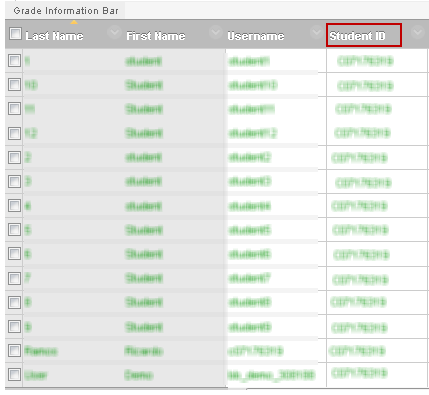
We recently changed the Student ID in the Blackboard Grade Center to the ID from CaneLink. This change will now allow you to identify Blackboard students in CaneLink.


The grade center column Student ID will hold the ID from CaneLink:


For additional information about exporting this data to an Excel spreadsheet, go to http://blackboardinfo.weebly.com/1/post/2013/12/downloading-umid-and-emplidid-from-canelink.html.


If you have questions or concerns about these upcoming changes, please contact the Blackboard team at: (305) 284-3949 or blackboardhelp@miami.edu


Sincerely,


Your Blackboard team

(P): 305-284-3949


[BB] Viewing/downloading student UMIDs and IDs from CaneLink in Blackboard.

Hello Blackboard User,


We recently changed the Student ID in the Blackboard Grade Center to the ID from CaneLink. This change will now allow you to identify Blackboard students in CaneLink.


The grade center column Student ID will hold the ID from CaneLink:


For additional information about exporting this data to an Excel spreadsheet, go to http://blackboardinfo.weebly.com/1/post/2013/12/downloading-umid-and-emplidid-from-canelink.html.


If you have questions or concerns about these upcoming changes, please contact the Blackboard team at: (305) 284-3949 or blackboardhelp@miami.edu


Sincerely,


Your Blackboard team

(P): 305-284-3949


Monday, November 25, 2013

[BB] ID from CaneLink will be added to Blackboard

Dear Blackboard Users,


The Student ID in the Blackboard Grade Center is being changed to the ID from CaneLink. Once this is done, Faculty will have an easy way to match students in CaneLink and Blackboard.


If you have questions or concerns about these upcoming changes, please contact the Blackboard team at: (305) 284-3949 or blackboardhelp@miami.edu


Sincerely,


Your Blackboard team

(P): 305-284-3949